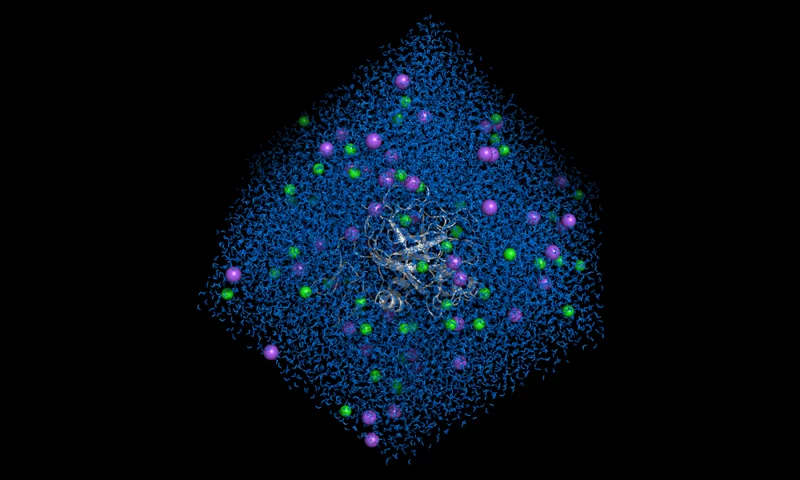
Use GROMACS Molecular Dynamics

Official Neurosnap webserver for accessing GROMACS Molecular Dynamics online.

Overview

Perform Molecular Dynamics using GROMACS framework, simulating many different solvent solute systems. Simulate proteins and enzymes in different solutions.

Neurosnap Overview

The GROMACS Molecular Dynamics online webserver allows anybody with a Neurosnap account to run and access GROMACS Molecular Dynamics, no downloads required. Information submitted through this webserver is kept confidential and never sold to third parties as detailed by our strong terms of service and privacy policy.

View Paper

Features

  • Simulates a broad range of molecular systems.
  • Returns many metrics including equilibration steps, RMSD, RMSF, Gyration Radius and more.
  • Allows you to specify custom durations for your molecular dynamics simulation in nanoseconds.
  • Simulation execution duration may range from hours to overnight. The time to job completion scales with the number of atoms and if the simulation is a protein-ligand interaction.
  • Only available for paid users.

Statistics

Neurosnap periodically calculates runtime statistics based on job execution data. These estimates provide a general guideline for how long your job may take, but actual runtimes can vary significantly depending on factors like input size or settings used.

Statistic Value
Credit Usage Rate loading...
Estimated Total Cost loading...
Runtime Mean loading...
Runtime Median loading...
Runtime Standard Deviation loading...
Runtime 90th Percentile loading...
Runtime Longest loading...

API Request

Access GROMACS Molecular Dynamics using the Neurosnap API by sending a request using any programming language with HTTP support. To safely generate an API key, visit the API tab of your overview page.

Similar Tools

Explore tools with similar features, categories, and use cases.

Job Note

Provide a name or description for your job to help you organize and track its results. This input is solely for organizational purposes and does not impact the outcome of the job.

Configuration & Options

Service Inputs

Upload a PDB file for the Molecular Dynamics experiment. Ligands and small molecules can be included in the uploaded PDB structure though this is not recommended as PDB files do not store bond order which can lead to inconsistencies in outputs. Molecules that are not defined in the specified force field will be auto-parameterized, though metal-organic and exotic compounds may fail. To set a specific pH, use our PDB2PQR service to adjust protonation states before submission.

Provide the chemical structure of the ligand or small molecule to include in the simulation. Input must be in SDF format, as this preserves both atom types and bond orders required for force field parameterization. Ensure the coordinates of your molecule are pre-aligned with the uploaded Input Structure, since all input files share the same coordinate system. Incorrect alignment may cause the molecule to be placed incorrectly in the simulation box.

Check this option if your input structure is missing atoms. We will attempt to repair it using PDBFixer by adding missing atoms and residues. This process may fail.

Advanced Settings

The duration of the simulation in nanoseconds. WARNING: Increasing this value will result in drastically longer simulations which can consume large quantities of credits.

The temperature of the simulation in Kelvin. We suggest the default of 300K (26.85C) for most use cases.

Select the forcefield to define the interaction potentials and parameters for the molecular dynamics simulation. Each option represents a specific parameter set optimized for various biomolecules and simulation types. We recommend AMBER99SB-ILDN or CHARMM27 for most cases.

The following options are the available box shapes for the solvent-system during the simulation.

Include water molecules in the exported trajectory. This is strongly discouraged, as it greatly increases file size and export time. Enable only if explicitly required for your analysis.

Ions Instructions

Specify the ion pairs, their concentrations, and charges to be included in the solvent for your simulation. Each row should define one ion pair, with values separated by colons (:). The format is:

POSITIVE_ION_NAME : NEGATIVE_ION_NAME : CONCENTRATION (mol/L) : POSITIVE_ION_CHARGE : NEGATIVE_ION_CHARGE
  • POSITIVE_ION_NAME → The cation to be used (e.g., Na, K, Mg).
  • NEGATIVE_ION_NAME → The anion to be used (e.g., Cl, Br, I).
  • CONCENTRATION → The final ion concentration in mol/L (e.g., 0.15).
  • POSITIVE_ION_CHARGE → Charge of the positive ion (e.g., 1 for Na⁺, 2 for Mg²⁺).
  • NEGATIVE_ION_CHARGE → Charge of the negative ion (e.g., -1 for Cl⁻, -2 for SO₄²⁻).


🔹 Example Input:

Na:Cl:0.15:1:-1
K:Br:0.23:1:-1
Mg:Cl:0.06:2:-1


⚠️ Notes:

  • Ensure charge values correctly match ion oxidation states.
  • Use a new line for each ion pair.
  • The system will automatically be neutralized using the first provided solvent.

See above instructions for information on how to use this input.

Ready to submit your job?

Review your configuration, then confirm the estimated credit cost before you run the job.

Note that credit estimates are not guaranteed and runtime can vary depending on inputs and settings.

Estimated Credits: calculating...

To submit a job please login or register an account.